• Home
  • Images of the Month
  • My Notes
  • About
  • Contact
    • Privacy Policy

iJourneys

John Gough Photography

May and June Images of the Month

by John Gough

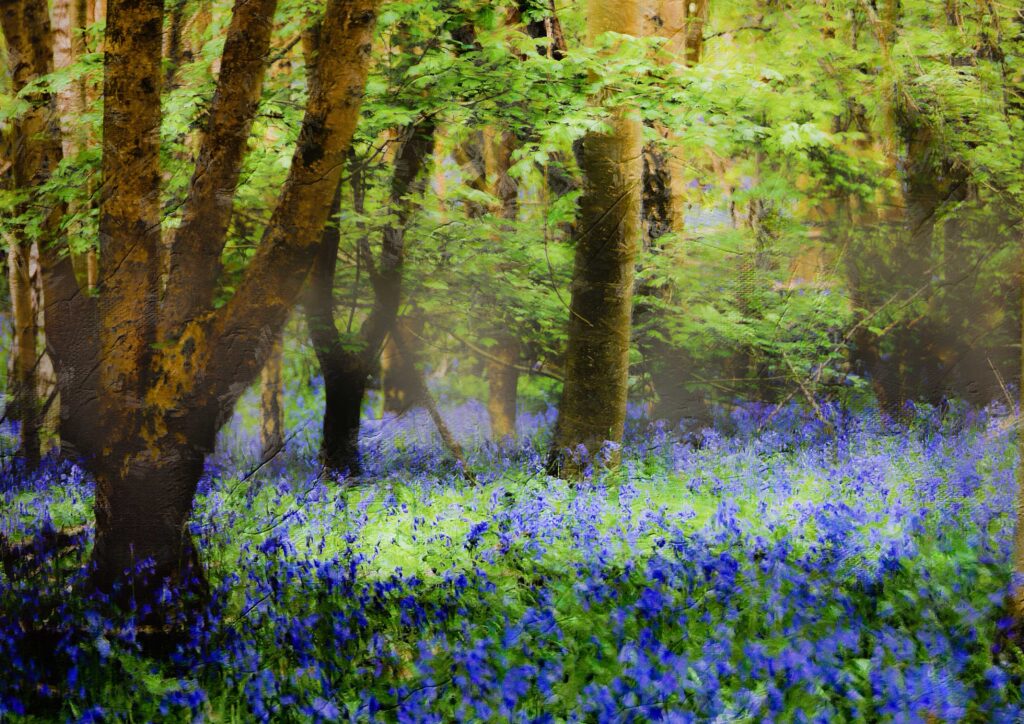
May: Bluebell Wood / John Gough
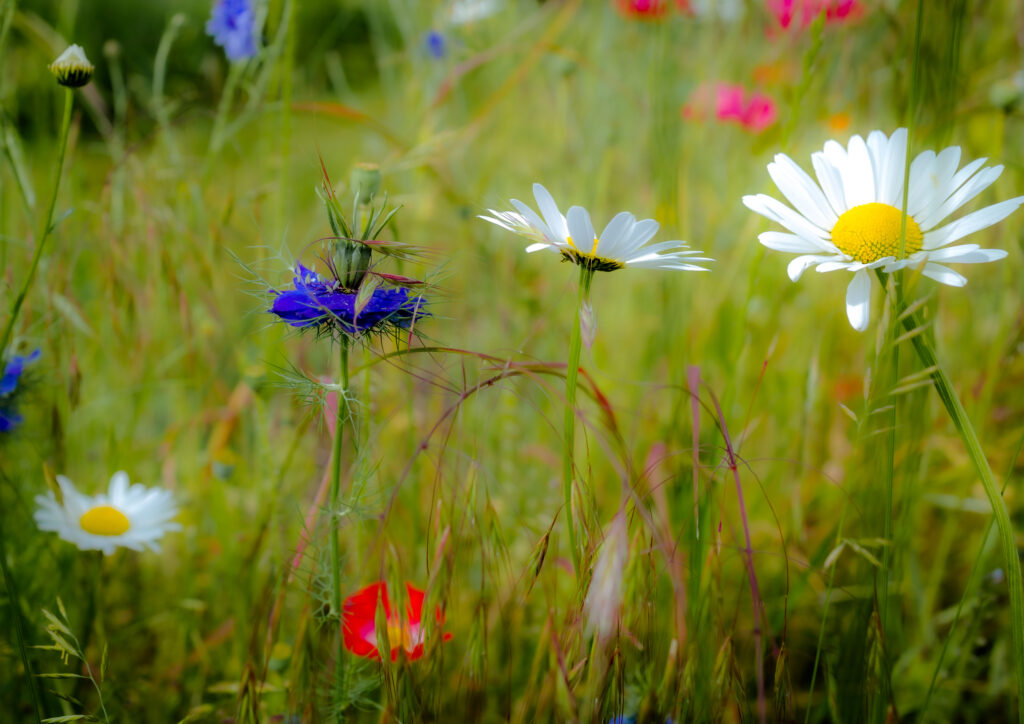
June: Flower Meadow / John Gough

My Images of the Month for the past couple of months demonstrate the importance of preserving nature. Especially preserving nature where plants, insects and animals can survive.

The number of insects in my garden in Bedfordshire, UK has declined horrendously over the past few years as farmers spread chemicals on their fields, and developers gobble up green sites for building. Loss of habitat is a major contributor.

Overall, 76% of the UK’s resident and regular migrant butterfly species declined in either abundance or occurrence (or both) over the past four decades.

Butterfly Concervation

Insects are declining at around 1% each year. That means an insect apocalypse in our children’s lifetime.
Filed Under: Journey

Canon EOS R3 Features

by John Gough

We have researched all we know about the Canon EOS R3. The launch is about 2 months away, for what will be Canon’s fastest mirrorless full frame camera. The EOS R3 is going to be the go to camera for sports and wildlife professional photographers for years to come. To get this right, Canon is going for some pretty awesome features.

Although the R3 will probably be too expensive for many amateurs, some new features do give us an indication of how camera technology is progressing and what we might expect further down the line for Canon mirrorless cameras.

Canon EOS R3 Features:

So let us look at what is new.

Stacked CMOS Sensor on the EOS R3

The R3 will be the first EOS camera to feature an entirely new stacked BSI CMOS sensor. The advantage of this type of sensor is the fast readout speed. This boosts the camera’s maximum shooting rate. With no mirror constantly flipping up and down, mirrorless cameras are pushing burst shooting rates ever upward, but now with this sensor they have just got quicker.

Faster readouts also mean faster autofocus. So fast that it happens in the blinking of an eye. This means shooting 30fps with full AF/AE tracking using the electronic shutter. Canon claim that even at this speed there will be ‘minimal distortion’ of the type usually caused by a rolling shutter.

So this begs the question why do we need a mechanical shutter?

Eye Control AF with the EOS R3

Yes, autofocus in the blinking of an eye. Look at a subject and the AF will follow your eyeball and focus on what you are looking at! This feature is going to be the most talked about subject of all. in the R3 reviews.

The original technology was first seen in the 22-year-old Canon EOS-3 film camera, but never progressed to digital. One of the problems was the tracking of eyes through glasses. What about sun glasses? 

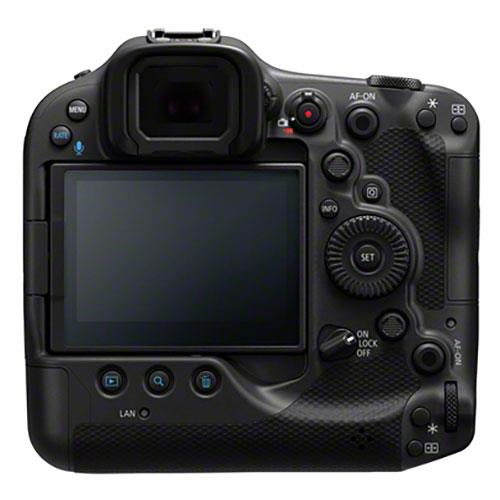
This is the rear of the Canon EOS R3 and it can be seen just how big the viewfinder has to be to accommodate this technology.

Canon EOS R3 Rear View

Capturing Movement with the R3

Canon insists that the R3 can master fast movement. This will not only interest sports photographers in the Grand Prix arena, but wildlife photographers capturing birds in flight. Canon eye tracking is already good with the R5. It will be amazing to see an improvement in this area.

Canon R3 Sensor Size

Rumour has it that the R3 will be priced around $6000. Below the Sony A1. Why? Well the A1 has a 50.1MP sensor. We don’t know the size of the R3 proposed sensor, but it could be that the R3 will have a smaller sensor. Perhaps as low as 20MP to enable sports photographers to quickly transfer images from the touchline.

UPDATE: We are now pretty confident that the sensor size will be 24MP

Just a thought, but what if the size of a sensor in the future is no longer linked to image quality? What if Canon’s new sensor is low in megapixels but has stunning image quality? Maybe through the use of new technology, perhaps even AI as employed on camera phones? There has been considerable research going on into this phenomena over the past few years. What if Canon has cracked it?

Canon EOS R3 Summary

What is quickly becoming apparent is that the R3 is an expensive specialist camera with awesome technology. It is not an amateur camera. We will not be seeing many at the local camera club outing to Clacton. However, what we can expect is that many of its new features will be headed for a Canon camera near you in the near future.

Filed Under: Cameras, Canon Cameras, Gear, Journey Tagged With: Canon Cameras, Canon r3, EOS R3, R3

LRPS Examples

by John Gough

LRPS Examples
An image from my LRPS panel / John Gough

LRPS Examples lists winning submissions from RPS members who have successfully passed the LRPS qualification.

The LRPS is a qualification from the Royal Photographic Society, which confirms that you are a competent photographer. How though do you know if you are a competent enough photographer? One way is to take a look at other winning portfolios.

The RPS require ten images, which must work together as a panel. The RPS show some successful LRPS example submissions on the qualifications pages of their website.

The better you can judge whether your work meets the standard. The more confidence you can have in submitting your own work.

Examples of Successful LRPS Panels

We have curated panels from RPS members who have shared their success on their own or others websites or social media.

  • Robert Rhead Good advice and his winning panel from 2015
  • David Travis. Good description of what images he included in his winning panel in 2020
  • Judith White. Steps to be successful+ panel
  • Simon Hawkins from 2013 + panel
  • Paul Terry. Nice graphics + panel
  • Sue Lambert from 2013 + panel
  • NickyR. Nice description of the assessment day + panel
  • Graham Scarborough panel on flickR
  • Peter Harris from 2015 + panel
  • Mike Ford Click on the panel to open it
  • Shaun Duke. Lots of background about his journey to the LRPS + panel
  • Danny Ewers. Description of the preparation for the assessment day + panel
  • Billy Waugh on the Edinburgh Photography Workshop website + panel
  • Grahame Skingley no panel but good advice
  • Tim Harris all landscape + panel
  • Andy Smith at Photography 10KH. An interesting website with analysis of failure and success + panels.
  • Allan James panel
  • Smethwick Photographic Society members LRPS panels
  • Richard Barrett at Chester Photographic Society
  • Ian Hardacre Good description of the advisory day and immediate preparation
  • Amateur Photographer good advice plus panel from Steve Jupp
  • Bookham Camera Club a selection of members panels
  • Alan O’Brien his website plus panel
  • Rachel Luff panel
  • Worcestershire Camera Club the LRPS panels from talented members
  • Kathryn Alkyns images and hanging plan
  • Exeter Camera Club members panels
  • Belfast Photo Imaging Club members panels
  • Winchester Photographic Society members panels
  • Chris Lauder description of journey + panel

LRPS Assessments

Now that the RPS has resumed assessments at their HQ in Bristol and other locations around the country, now is a good time to think about your LRPS journey. If your photography is as good as the thirty LRPS example panels above then you are on your way.

My LRPS

It was the first real photography project that I ever undertook, and achieving the LRPS felt like a big deal. Joining a camera club was a good move for me because it taught me what the judges would be looking for in terms of technical excellence, and I hope I have helped others with this one big tip.

Filed Under: Journey, LRPS, RPS Tagged With: LRPS, RPS Distinctions

Life in Lockdown

by John Gough

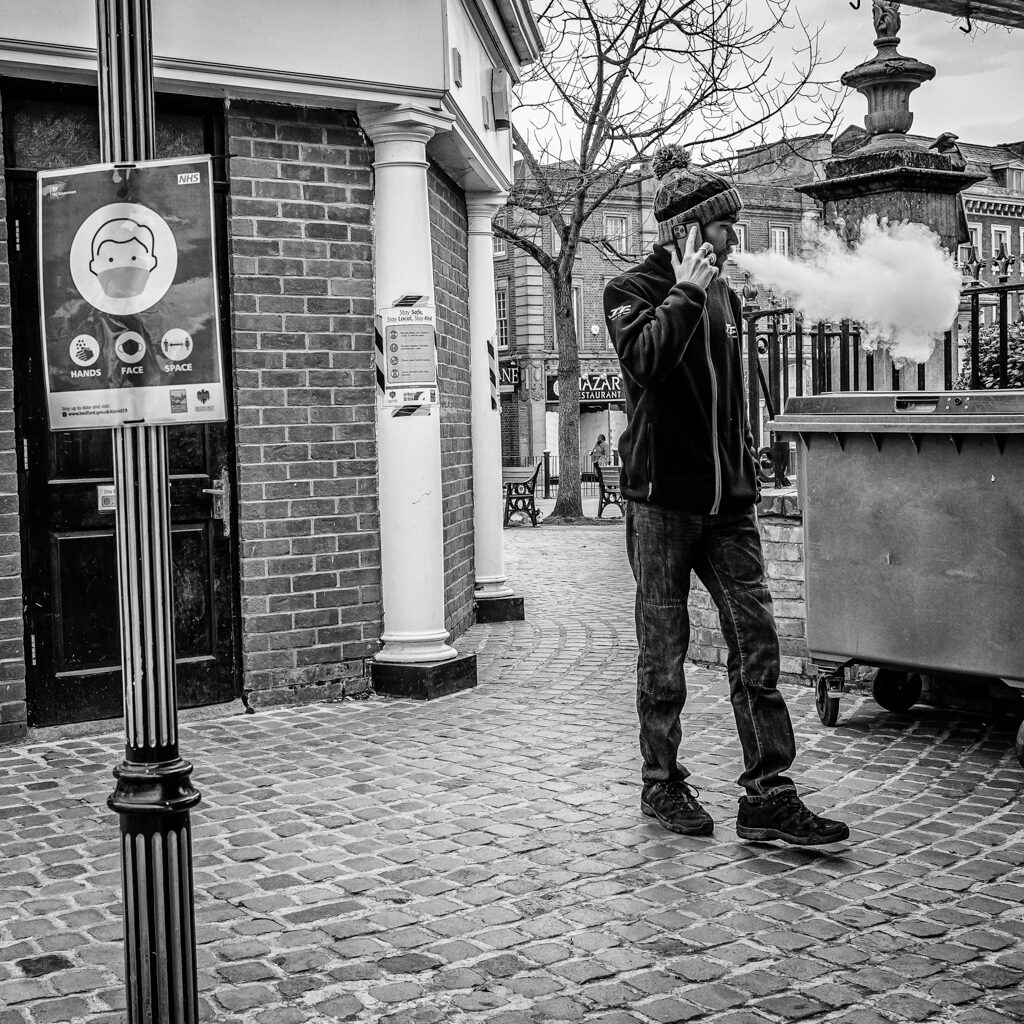
Hands, Face. Space. Life in Lockdown / John Gough / Canon EOS R

Like many other photographers, the coronavirus pandemic was an opportunity to document what will hopefully be a unique time in our lives.

This was the third lockdown in the UK, it started in January 2021, but it is estimated that life will not be fully ‘back to normal’ until the end of June when some travel restrictions to other countries are still likely to remain.

The series of images, Life in Lockdown are here.

Filed Under: Journey, Street Photography Tagged With: Projects, street photography

The Canon EOS R3 Is a Beast

by John Gough

It is no coincidence that it is the Olympics this year in Japan, and that Canon are putting out teasers about their new sports focussed camera the Canon EOS R3.

This is What Canon Say About the EOS R3

A camera designed to capture the fastest moving action in a way never thought possible. Specialised for capturing objects moving at high speed. Built to meet the demands of professional sports users with ultra-responsiveness, high sensitivity, reliability and durability.

This is What We Know About the Canon R3

Well, this is what we think we know, not much has been officially announced:

30fps

A whopping 30 fps shooting with continuous AF. That is compared to the 16fps on the flagship Canon EOS 1DX MkIII and the 20fps on Canon’s top mirrorless R mount camera, the Canon EOS R5.

BSI CMOS

A new BSI CMOS sensor. To interpret, this means that the sensor is backside illuminated. This improves low light photography. It is a technology that has been used on smartphones since the iPhone 4, but has been difficult to introduce to larger sensors.

Stacked CMOS

It is likely the new sensor will be a stacked CMOS sensor, like that announced for the Sony a9. As this video explains this allows much a faster readout from the sensor to achieve these amazing shooting rates with continually updated auto exposure and AF.

The new sensor will likely solve the stretching of images caused by rolling shutter distortion. As Canon put it, ‘minimal image distortion when using the electronic shutter’. This means that mechanical continuous shooting will become a thing of the past. It could even mean that mechanical shutters go the same way as those old fashioned mirrors.

Viewfinder Update

Another advantage could be, that the electronic viewfinder (EVF) can be updated in almost real time, and therefore begin to meet the performance of optical sensors. This is one of the reasons that pro sports photographers have been slower to move away from traditional DSLRs than other pro photographers.

Eye Controlled Focussing

Eye controlled AF makes the old joystick seem positively medieval, but Canon is promising that by looking through the EVF you can use your eye to control the focus point. Subject tracking and even eye tracking are now so advanced that it makes you wonder how this feature will work?

Plus Canon are promising that their AF algorithms will now track other subjects as well as faces and eyes. My bet would be on racing cars.

So What About the R1?

We were thinking that the next camera to be launched by Canon would be the Canon EOS R1. A replacement for the top of the range Canon EOS 1DX Mark III. However, the proposed Canon EOS R3 is intriguing because it is what we thought the R1 would be, but it has not been designated as the R1. The R5 and R6 have slotted into the lineup as replacements to their DSLR equivalents

So what will the R1 be like?

Filed Under: Canon Cameras, Journey Tagged With: Canon Cameras

Street Photography Close Up

by John Gough

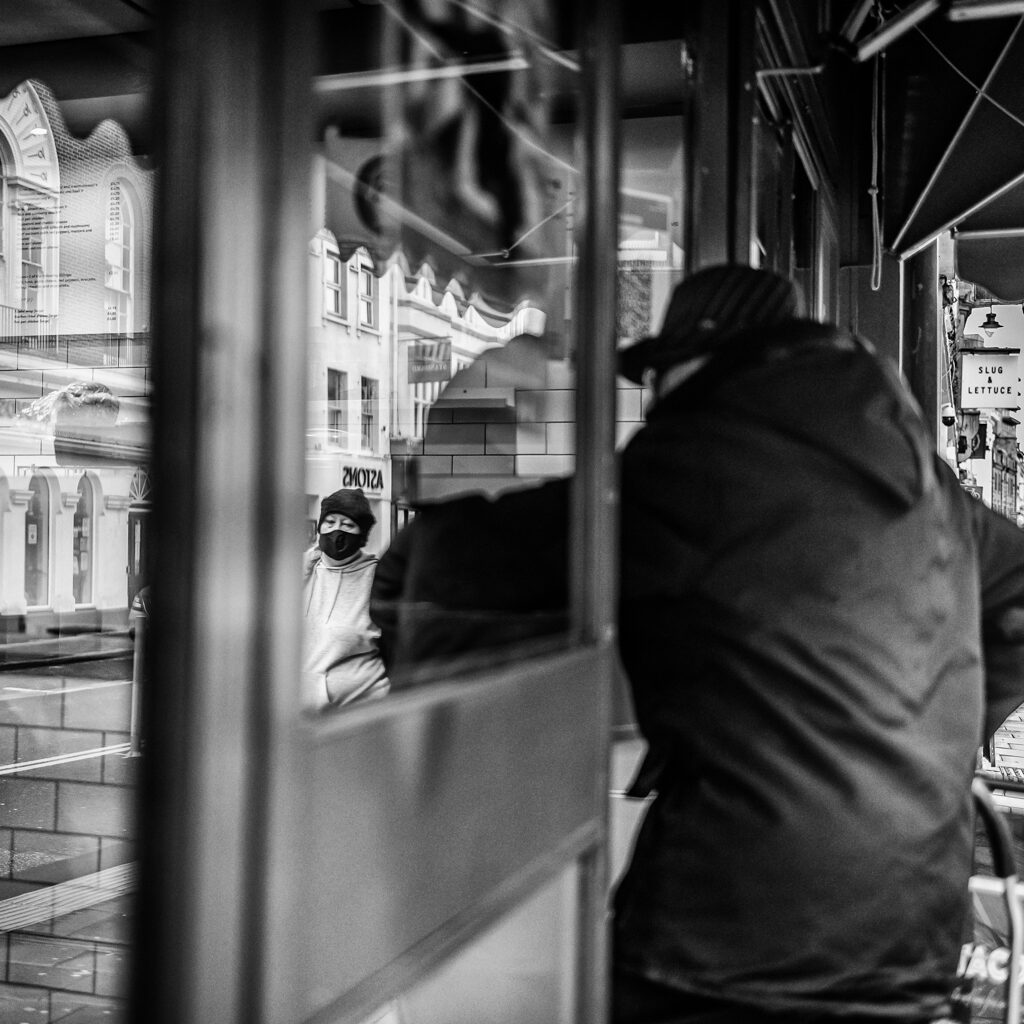
Street Photography Close Up / Life in Lockdown: The Mask / John Gough / Canon EOS R

I am reinventing the way I approach street photography. I want to do more street photography close up. So this is how I have changed my street photography technique and adapted my kit to make this happen.

If you are a visitor to these pages you will be aware of my love of the photography of the great New York street photographer Joel Meyerowitz and Scottish photographer Dougie Wallace. The immediacy and spontaneity they bring to street photography is so much more refreshing than the easy urban shot taken with a long lens.

So if you are going in for street photography close up. How do you adopt an in your face attitude, without getting your face slapped?

Street Photography Advice from Dave Mason

I was watching a Zoom presentation by Dave Mason. He is the master of juxtaposition as you will see if you visit his website. He talked about how he gets in close for street photography.

This is his advice:

  • Walk slowly so as not to draw attention.
  • Stand or sit and wait to become part of the scene
  • There is no time to adjust a zoom lens and doing so would draw attention
  • Use a prime lens and zoom with your feet.
  • Do not lift the camera to your eye
  • Hold the camera in front of your chest
  • Frame the shot through the rear screen

Setting your Camera for Getting in Close on the Street

I use a Canon EOS R, and I have set a custom button to switch the camera into street photography mode.

I use a 35mm prime lens, a 28mm may be better. Cartier-Bresson used a 50mm lens.

These are the settings I use:

  • Prioritise shutter speed over aperture and depth of field. You are going to be working up close. Movement is exaggerated the closer you are. So ramp up the shutter speed to capture that action.
  • Set to shutter priority fast enough to capture movement without blur i.e +400th sec.
  • Use a high ISO 1000 – 1600 or higher depending on your camera to achieve as wide an aperture as possible.
  • Set to continuous shooting so that by holding down the shutter release you fire off as many shots as possible to increase your chance of that ‘decisive moment’.
  • Set your AF to servo and tracking, if your camera can hack this. Don’t worry if not. Cartier-Bresson’s 35mm Leica rangefinder camera was little more than point and shoot compared with today’s technology.
  • Set your shutter to silent release. A traditional DSLR with a noisy mirror lifting mechanism may be too much in a close environment.

Actioning Street Photography Close Up

Putting all this together I now walk slowly, without drawing attention to myself with my camera unobtrusively in my left hand, tethered to my arm with a wrist strap. When I see a picture I raise the camera to my chest, steady it with my right hand and shoot.

Try it for yourself. Street photography close up, can be thrilling, you are in with the action and could lead to some spontaneous and unique photographs.

Filed Under: Journey, Street Photography Tagged With: street photography

Pete Souza: The Way I See It

by John Gough

The Way I See It, is a documentary about former Chief Official White House Photographer Pete Souza. Recording his personal journey as an image maker, with top secret clearance and total access to President Obama.

As a photographer, the film is interesting because it shows the way Pete Souza worked. It is accompanied by hundreds of examples of his work, which are wonderfully clear and compassionate.

Shade

On another level, the documentary is a comparison of the Obama presidency with that of his successor Donald Trump. Souza was apolitical and photographed four presidents including both the Reagans and the Obamas. What changed was what he saw as Trump’s total disregard for the Office of President.

His book Shade documents why he considered Trump unfit for office.

Pete Souza Photography

It is his however his photography that I find spellbinding. The photographs are more than just a record of the Presidency. OK, the Obama’s are undoubtedly photogenic, but the intimacy he has been allowed to capture shows a trusting and valued relationship between President and photographer.

His range is impressive, from formal group portraits with a medium format camera and studio lights. To press photography with flash and long and wide lenses. To intimate portraits indoors using just available light.

You can view his work in his book, Obama an Intimate Portrait, which contains over 300 pages of his Obama photographs

Precious historical documents . . . vividly human and often funny . . . these images tell the true story of a presidency that words have failed’ Jonathan Jones, Guardian


The Way I See It: Video

Watch, The Way I see It on Prime Video either rent for £1.99 or buy.

Filed Under: Journey, Photographer, Photography Tagged With: photographers

Scanning Old Slides

by John Gough

Scanning Old Slides
Scanning Old Slides

Scanning old slides to your computer? I had been meaning to do this for years, but the pandemic lockdown has given me the opportunity.

There are boxes of old slides in my loft. Taken well before the dawn of digital. I no longer have a projector, so the only way to bring these pictures to life is to scan them. Creating digital copies that I could access on my PC.

Scanning Old Slides: The Options

How? The options are, you can do it yourself or have your slides converted to digital files by a commercial scanning service.

Commercially Scanned Slides

There are scanning services like Digital Converters. Send them your slides and they will professionally convert your old slides to digital images. The cost is about £350 for 1000 slides.

Each slide is scanned as a high resolution image. Digitally corrected for exposure, colour and sharpness, and converted to JPEG. The files are streamed to the cloud or returned on a DVD or memory stick.

This is obviously the route to choose if you have high quality slides.

Scanning Old Slides Yourself

My slides are mostly family snaps, so based on the principle of garbage in garbage out. I decided to scan my slides myself.

On YouTube, there are several tutorials about setting up your camera to photograph slides and there are apps for your phone. However, taking an image of each slide individually seemed unnecessarily time consuming

So I decided to buy a cheap slide scanner. Researching online it seemed that they did a reasonable job quite quickly. I also thought that in the future I could use the same scanner to process old negatives.

Slide Scanners

Scanners are listed on Amazon here. I purchased this scanner.

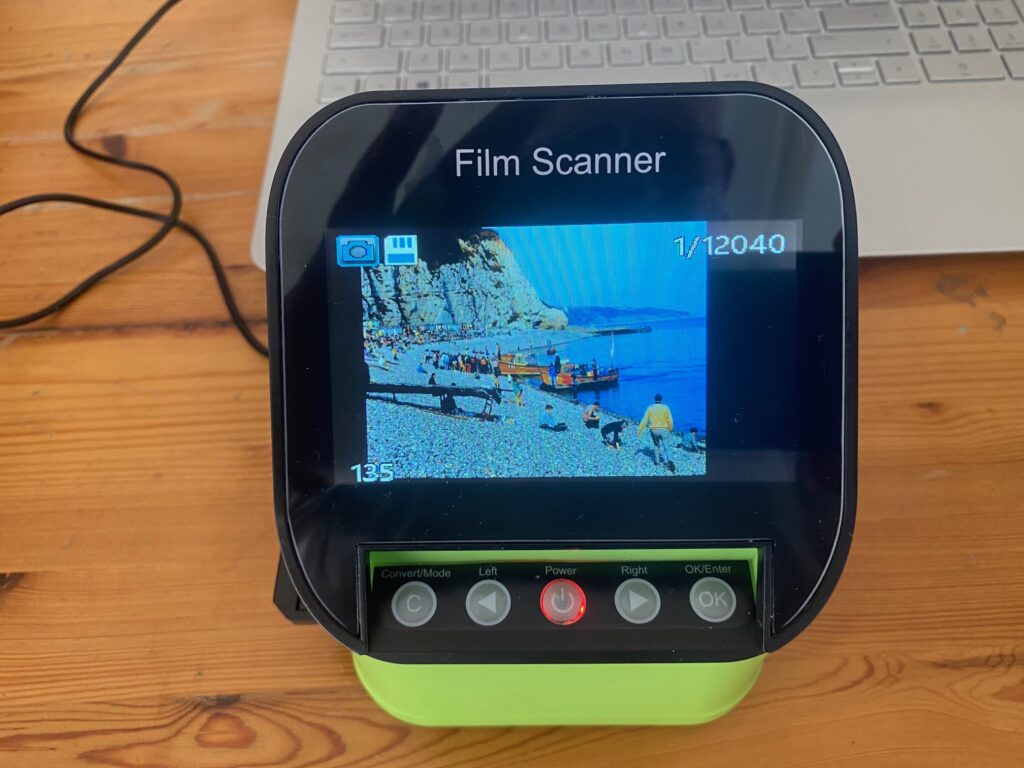
The scanner had good reviews, the output was to a standard SD card and the display was large enough to view the images clearly.

How to Scan Slides to a PC

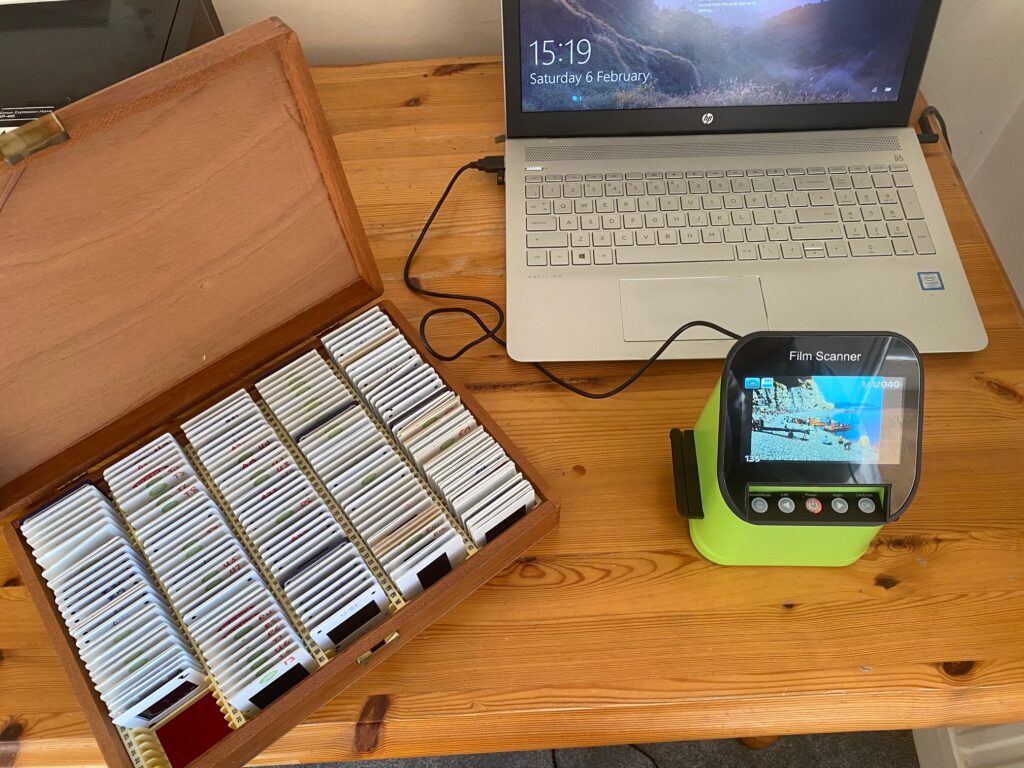
I used a setup with a scanner connected to the USB port on a laptop. The laptop has an SD card reader, so the transfer from scanner to PC was just one step. (N.B. The SD card is not included with the scanner)

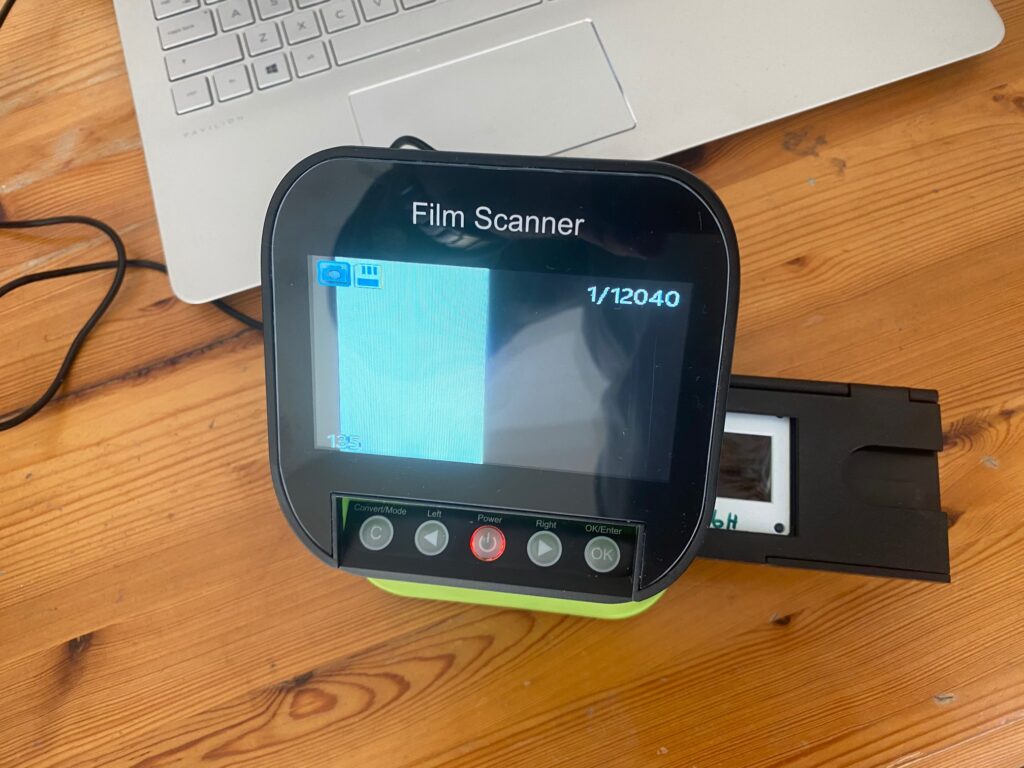
There are various film holders included with the scanner. The slide holder fits into a slot on the side of the scanner. The slides are pushed into the holder and the holder pushed into the scanner.

Scanning Old Slides
Insert the slide into the holder and holder into the scanner

I found I could process around fifteen slides in about five minutes.

Scanning old slides
Push holder into the scanner to display slide

The image is captured on the SD card as a JPEG. When the image is transferred to the PC I used Lightroom just to crop, adjust the colour balance, exposure and saturation.

I removed dust spots, and looked to improve the sharpness and noise level.

So what do the results look like?

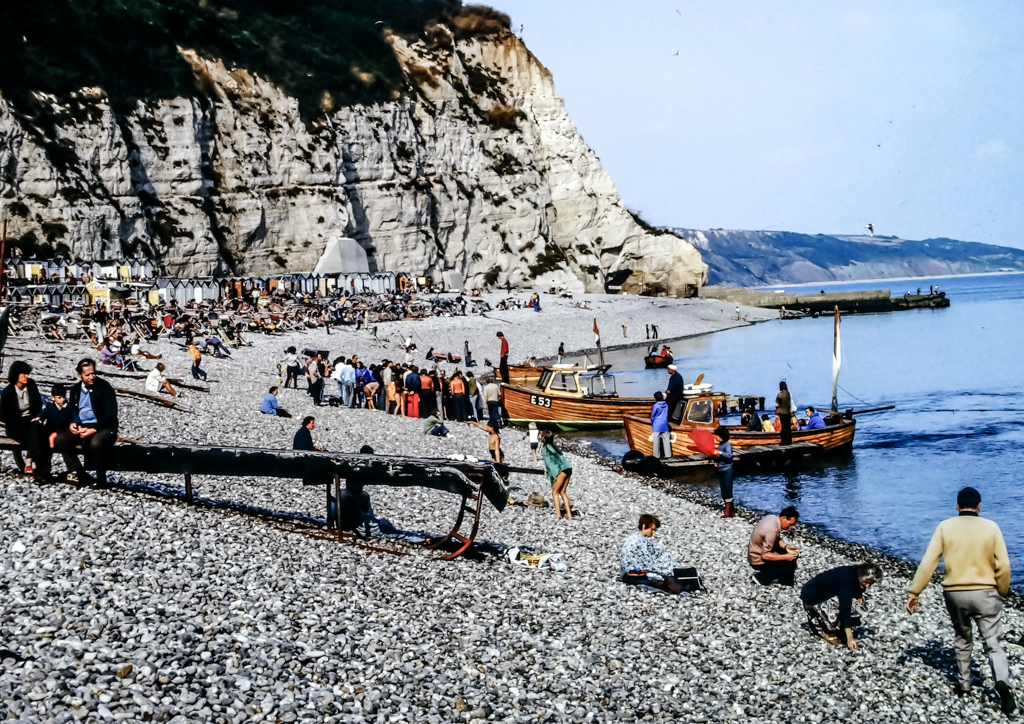
This was taken on holiday in Cornwall,

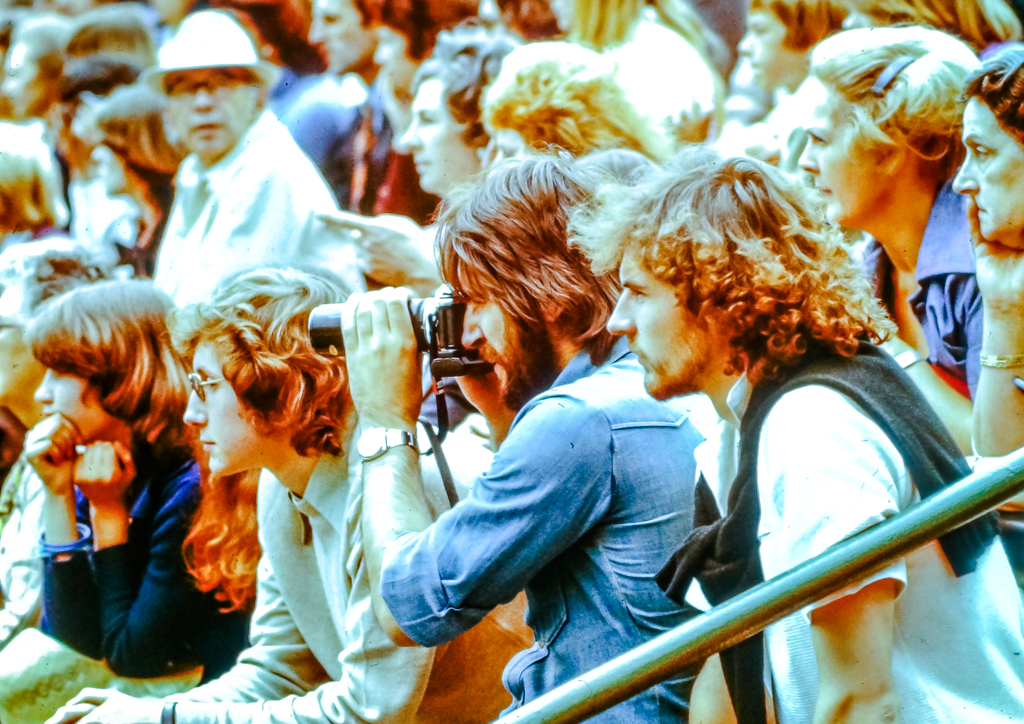
and this taken at Wimbledon in the seventies. (Note that even back then I was more interested in the camera than the tennis)

The results are not too bad really. Decent exposure and detail considering these slides are over forty years old!

Filed Under: Gear, Journey, Post Processing Tagged With: copy slides, digital files from slides, digitize slides, scan slides, slide scanning post processing

Post on Instagram from a PC

by John Gough

How to post on Instagram from a PC

How can I post on Instagram from a PC? I like to share my work on social media, on Facebook, Twitter and Instagram. On Facebook and Twitter, I can log into my account on a PC and upload my photographs. That is not possible on Instagram. So how can I post my images to Instagram from a laptop or a desktop?

Instagram started as primarily a social network for mobile users. However, it is now an important platform for business, influencers, artists, writers, bloggers, and vloggers. For many of these users, it is a tedious process to upload content to Instagram from a PC. It is especially tortuous for photographers who will have images stored on computer hard drives, external drives and in the cloud. For them, it is a lengthy workflow to download images from these drives, upload to a cell phone and then post to Instagram.

Fortunately, the solution is simple, whether you use a Chrome browser or Microsoft Edge. You can easily transfer photographs from a PC directly to Instagram. No additional software is required.

If you use a Chrome browser this is how to post on Instagram from a PC in a few easy steps.

How to Upload Pictures to Instagram from a Laptop or PC Using a Chrome Browser

1 Profile …..(re How to share to Instagram from a PC)

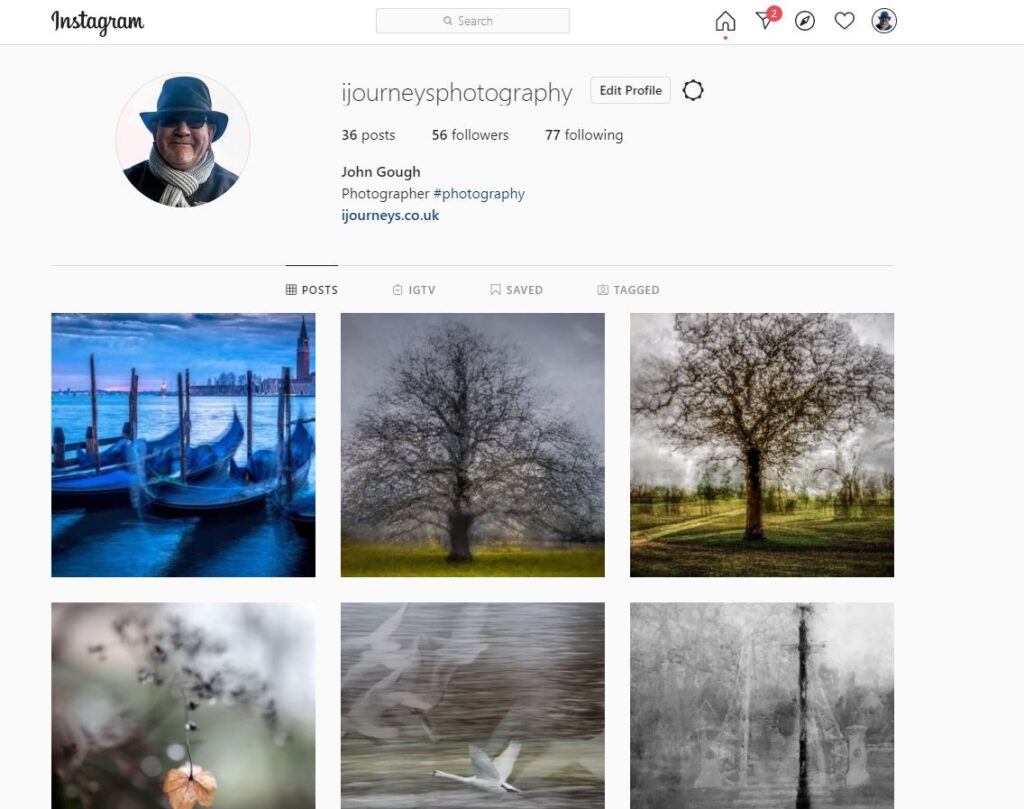
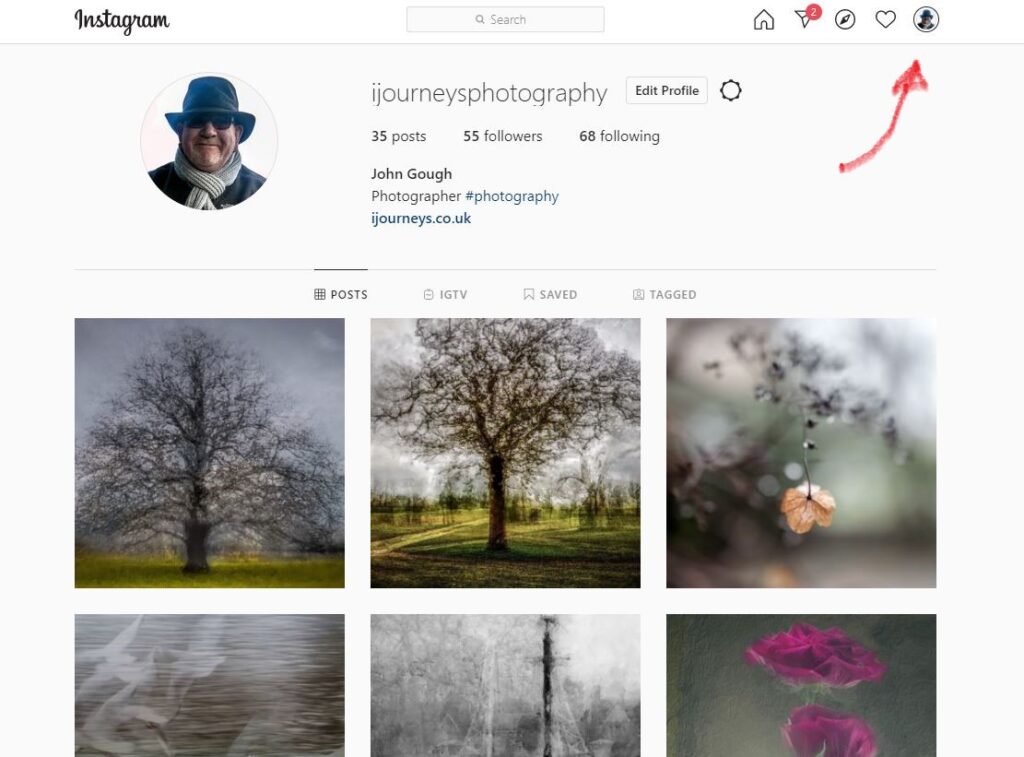
Log into Instagram by signing in, and go to Profile (see Illustration 1)

How to post to Instagram from a PC
Illustration 1 How to post to Instagram from a PC

2 Inspect …..(re How to transfer content to Instagram from a PC)

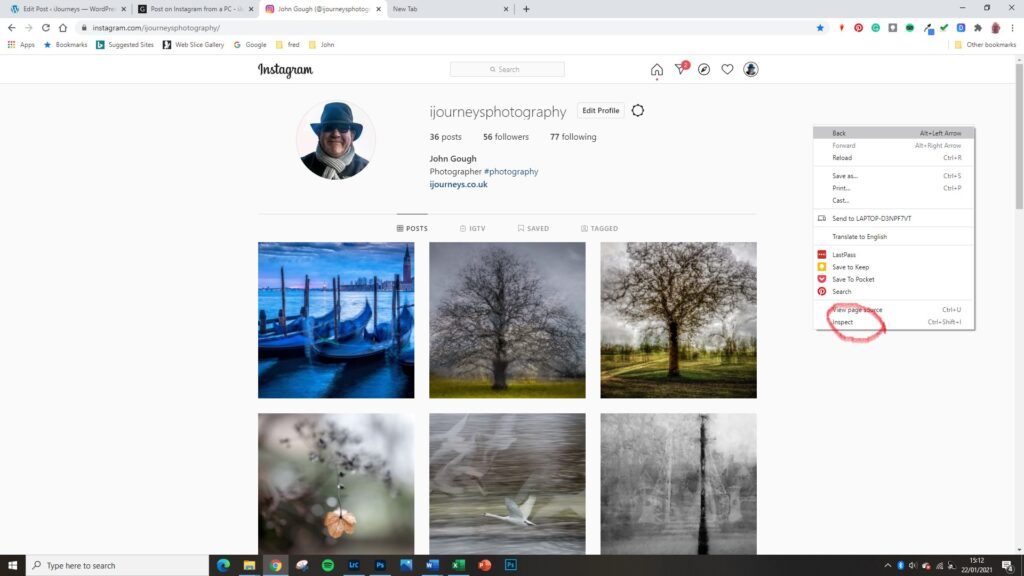
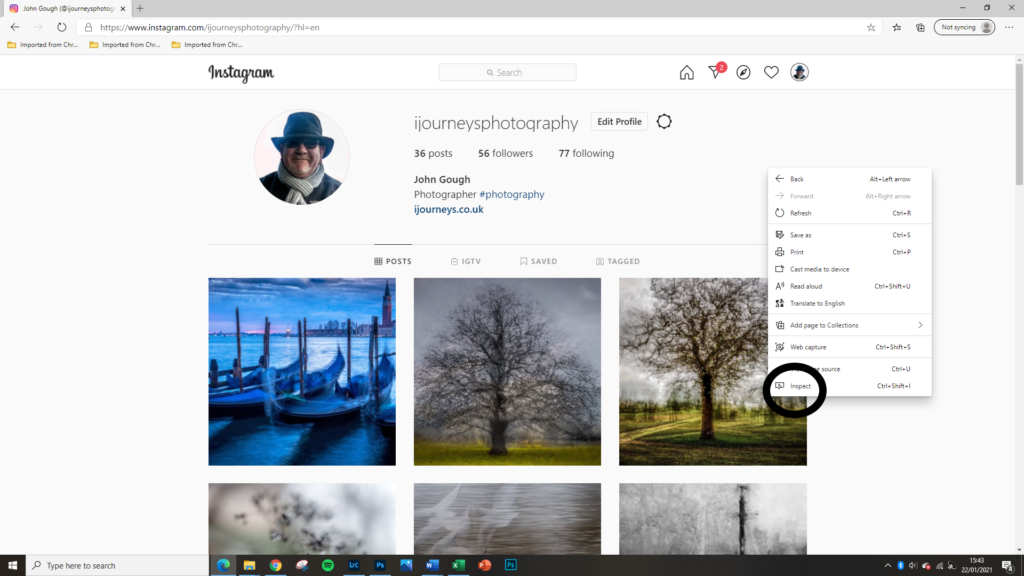
Right click the mouse anywhere on the page, and a drop down menu will appear. On the drop down menu go to Inspect. Mouse left click to reveal the HTML code for that page. (See Illustration 2)

Illustration 2 How to post to Instagram from a PC

3 Toggle …..(re How to transfer photographs to Instagram from a PC)

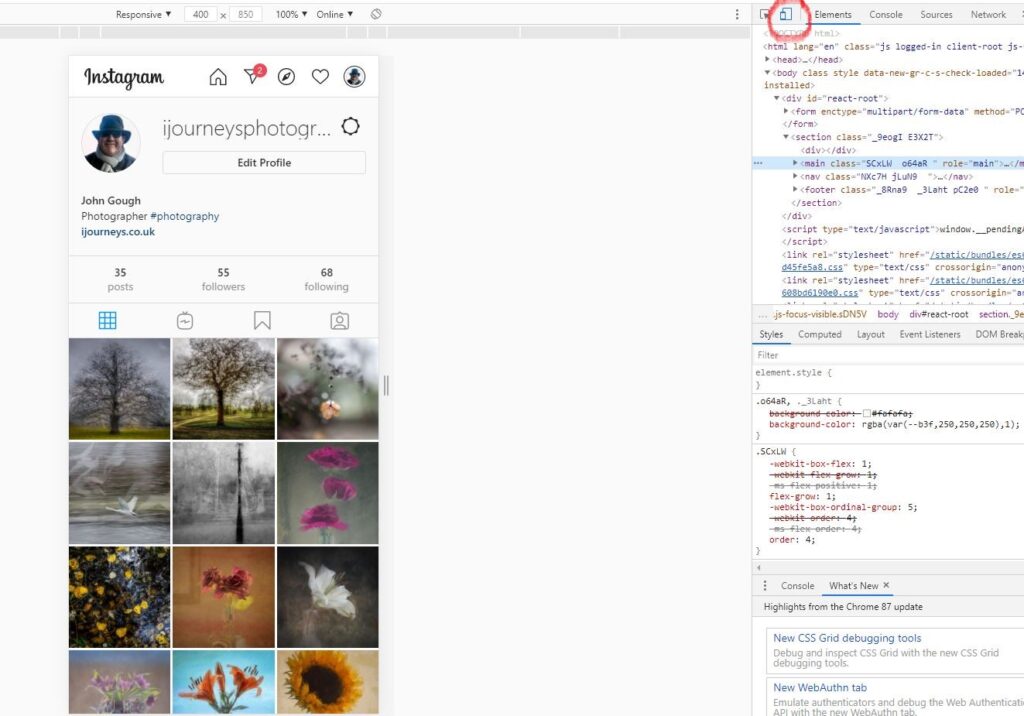
On the top left in the header area of the code are icons for desktop and mobile. Toggle from desktop to mobile which is the second one in. Click on Mobile. (See Illustration 2). The page will now reproduce how your mobile device shows Instagram. Do not click off the HTML code using X

Illustration 3 How to Post on Instagram from a PC

4 Refresh …..(re How to post images from a PC to Instagram)

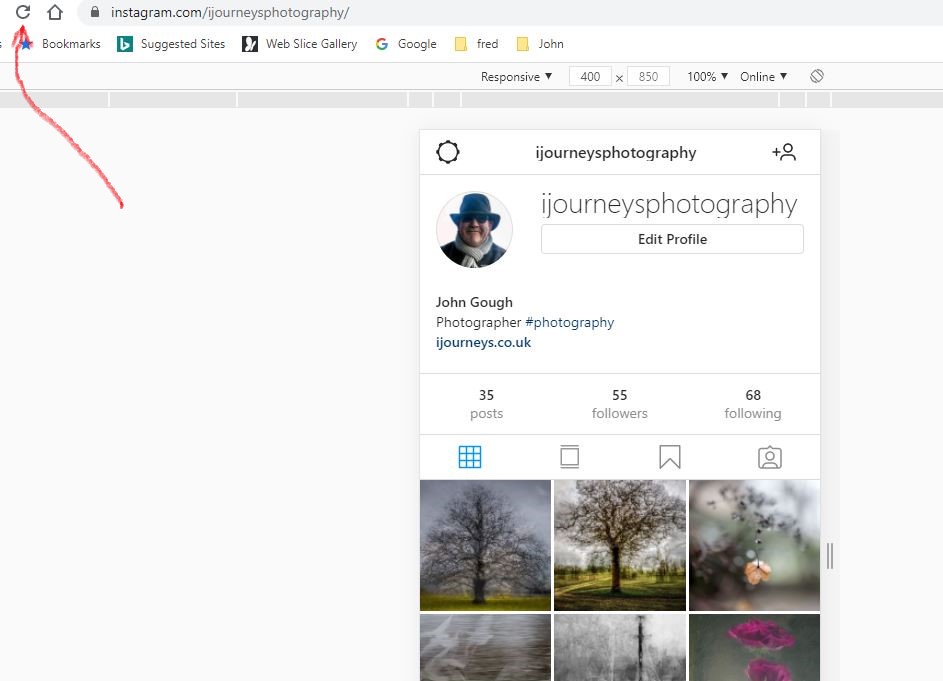
Refresh the page. Either by clicking the Refresh icon. See illustration 4 or pressing F5. The page will now reproduce exactly how your mobile device shows Instagram with the + icon displayed.

Illustration 4 How to Post on Instagram from a PC

5 Post ……(re How to upload content from a desktop or laptop to Instagram)

Use the + to upload your photographs to Instagram just as you would on your mobile. See Illustration 5

Illustration 5 How to post on Instagram from a PC

How to Upload Pictures to Instagram from a Laptop or PC Using Microsoft Edge / Explorer

In Microsoft Edge / Explorer the process of loading content from a PC to Instagram is exactly the same as in Chrome.

  • Open Profile
  • Mouse click right to open Inspect
Illustration 6 How to post on Instagram from a PC using Microsoft Edge
  • Toggle & Click the mobile icon.
  • Refresh the page
  • Post the picture

This workaround has saved me so much time. I can now easily interact with 1 billion Instagram users.

Filed Under: Journey, Photography, Post Processing Tagged With: Instagram, Post Processing

Bailey Portraits

by John Gough

It is strange isn’t it that you have views on everything but you know nothing. My view of the photographer David Bailey was that he was a famous fashion photographer of the ’60s, who went on to shoot some portraits of celebrities. For example the famous photograph of Michael Caine with a cigarette.

What I had not understood was the depth of his work and his astonishing output over the years since the 1960’s.

At Christmas I was lucky enough to receive Baileys Stardust, the book that accompanied a major exhibition of his portraits at the National Portrait Gallery, London in 2014.

The portraits in this book were personally selected by Bailey from his work over fifty years. These include actors, writers, musicians, politicians, film-makers, models, and artists. As well as the people he encountered on his travels to Australia, India, Sudan and Papua New Guinea.

It is uncanny how he can bring something fresh to faces that we are all familiar with. Creating something extraordinary.

As Bailey said:

“It takes a lot of imagination to be a good photographer. You need less imagination to be a painter because you can invent things. But in photography everything is so ordinary; it takes a lot of looking before you learn to see the extraordinary”

Resources

I have attached a documentary about the irascible but brilliant Bailey, and collated some of his portraits here

The book, Bailey’s Stardust may be about to go out of print. This version is in Spanish, but get it while you can. It is the photographs that you will want to savour.

Filed Under: Journey, Photographer Tagged With: David Bailey, photographers

« Previous Page
Next Page »

My Latest Notes About Photography

  • Remembering Martin Parr
  • Let them Shoot JPEGS
  • I Am Martin Parr
  • Lightroom Presets Using ChatGPT
  • Experience Saul Leiter

What’s in My Notes

Copyright: John Gough 2025